Blog
/
Editorial

Building HubSpot apps in 2025: What’s new, what’s changing, and how to get started.
Published
December 11, 2025
Last updated
December 18, 2025
HubSpots developer ecosystem is changing a lot, so let's break down what is changing for developers like yourself.

HubSpot’s developer ecosystem has expanded rapidly over the last two years. With the release of HubSpot’s Developer Platform, they are transitioning away from legacy CRM extensions, which were all crammed in the side-bar, toward a much more capable environment by taking apps out of the side panel with App Cards, alongside a modernized HubSpot CLI, and a long-awaited local development workflow.

Whether you’re building a lightweight internal integration or a full commercial app for the marketplace, understanding these changes is essential. This post summarizes the key improvements, how the new platform differs from the legacy model, and what new tooling options are available to developers in 2025.

The new HubSpot app environment

HubSpot’s new development environment is designed to be significantly more extensible, structured, and consistent than the previous generation of “sidebar-only” CRM extensions.

Extensible App Cards

Extensible UI options like the App Card are the centrepiece of the modern HubSpot app framework, compared to legacy CRM Cards (deprecated in 2025 and sunset in October 2026).

At a high level, the key differences are:

  • Placement is flexible: cards can appear in the main record pages, not just the sidebar.
  • Rendering is reactive: extensions use React UI components within HubSpot’s native UX.
  • Data access is easier: apps fetch data through <inline-code>hubspot.fetch()<inline-code>, which handles the data handling process for developers out of the box
  • More ways to view data: App Objects, Events, and eventually Home Pages provide a path to more deeply integrated experiences.

Account executives and BDRs can rejoice now as information can be more digestible at a glance, rather than a slow, clunky sidebar. Rather than sit, wait, and scramble to review the Legacy apps data 5 minutes into the customer call, sales teams can be right on time with the center page app card, giving them what they need at a glance, between back-to-back calls.

App settings & app home

The new App Settings and App Home experiences allow developers to build configuration UIs directly inside HubSpot. You no longer need an external settings page or a separate admin dashboard. Apps can now:

  • Store and render their own configuration screens
  • Allow merchants to manage connections and preferences
  • Use the same UI Extensions framework as CRM-facing cards

This closes a long-standing pain point for app developers and users where the app existed on an object page side-panel.

Other changes for developers 

There is a large list of beneficial changes for developers, all in the right direction, with more development environment customization, logging, and promised consistency for future HubSpot API changes.
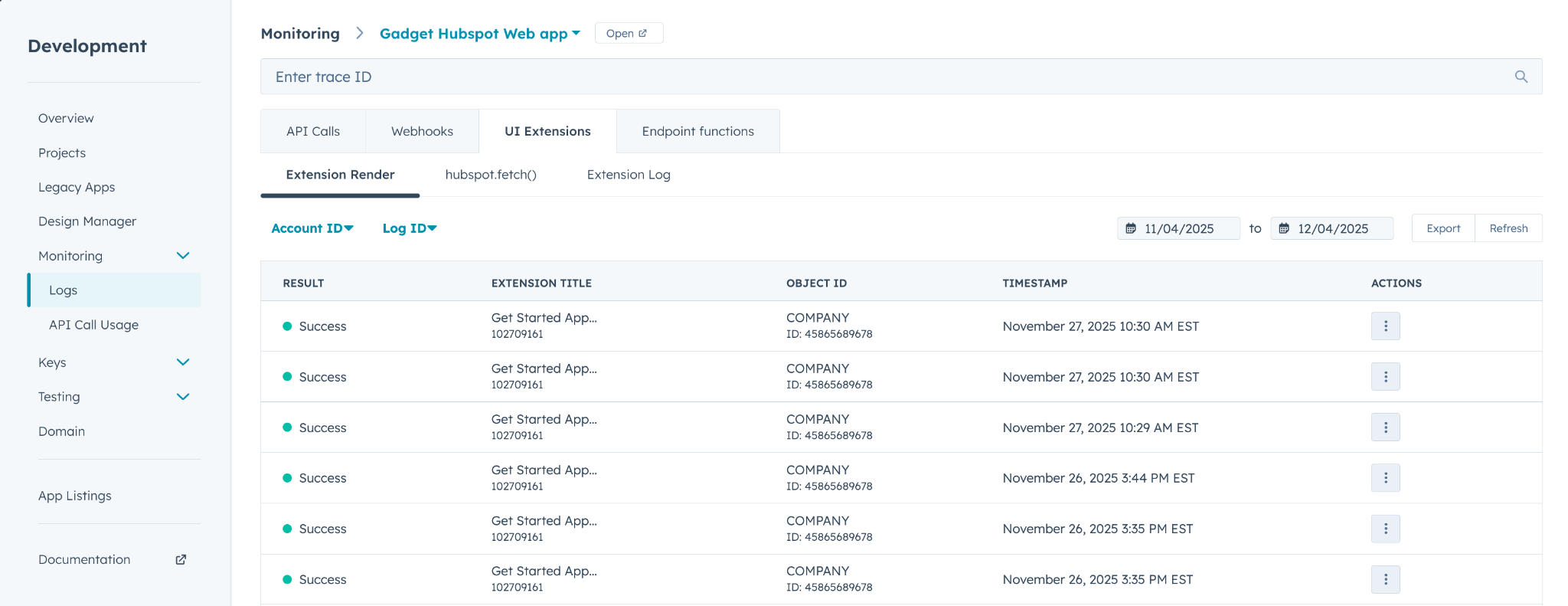
These changes include:

  • Developers can now configure which combination of hub and tier their test accounts are, whereas before it was always enterprise
  • Developers can configure & deploy single projects across multiple environments, as well as define and set reference environment variables
  • Easily integrate Sentry and Honeycomb for logging and debugging
  • Regularly cadenced releases for API updates in March and September, as well as selectable versioning. 

A notable feature in the HubSpot CLI is the <inline-code>hs get-started<inline-code> command, which scaffolds a working starter app, authenticates the CLI, and walks developers through deployment and installation. During this process, templated app cards, AGENTS.md, and CLAUDE.md are generated so your app is AI-ready as well.

HubSpot has also promoted several upcoming Breeze AI features designed to help developers build faster by searching documentation, educating, exploring, debugging, and scaffolding. Breeze is also exposed through an MCP server, enabling the same AI capabilities to be used in any MCP-compatible environment, such as IDEs or chat tools.

Of the mentioned AI features, the only ones currently available are the “Fast and Intelligent” documentation search, and debugging. The accompanying material with these statements is just the AI chat found in the developer documentation page, and not embedded in the app logs page. 

So far, anecdotal experience with these features feels like another AI assistant straight from Anthropic, lightly wrapped in whatever content it’s claimed to be an “expert” on. Key highlights from my experience of using Breeze AI are:

  • This was a miss for me as a result of the expectations. I found it quite slow, strangely clunky with page navigation, and the Assistant did not seem properly educated or integrated on the HubSpot docs knowledge base for about half of my questions.
  • There were instances where I could tell it was not searching the HubSpot docs for questions I had and used external information that did not pertain to HubSpot's components.
  • Heavily gravitates to assuming all questions pertain to Legacy apps 
  • There was a specific instance where I got lost in the HubSpot menus (as we all do) and asked the Breeze AI “Where can I find my App’s logs”. The response was that “Legacy Apps do not have logs”, and when I clarified more that this is a “Non-legacy app” it told me HubSpot does not have logging capabilities, and I will need to use an external platform. I knew it existed as I do use the logs in HubSpot, and eventually found it myself in /Development/Monitoring/Logs. Then selected my app from the dropdown menu at the top of the screen.

Authentication

With the expansion of the HubSpot app store comes a push for a standard web application experience, meaning OAuth for multi-tenant apps. You will still have the option of static auth for private app distributions. 

If you are looking to have your app be publicly listed on the HubSpot app marketplace, you will need to use OAuth. 

If you are building a private app for a single client, an internal tool, or just want to start building without worrying about OAuth, Hubspot's static authentication is a fast way to get started.

The primary difference between OAuth and static is how your application backend will obtain its access token. With OAuth, your backend must perform the full authorization flow. This includes generating an authorization URL using your HubSpot app’s Client ID, Client Secret, redirect URI, and required scopes.

Users are redirected to HubSpot to grant access, and HubSpot sends your backend a temporary authorization code at the redirect URI. Your backend must exchange this code for an access token and a refresh token using HubSpot’s token endpoint, then store and refresh these tokens as needed. In contrast, static auth allows you to manually supply the Client ID, Client Secret, and permanent access token without performing redirects or token exchanges.

For more information on working with OAuth you can check out HubSpot’s developer docs, OR stay tuned to our Gadget blog for our upcoming Gadget app template for HubSpot Oauth, which will have a working implementation for HubSpot Oauth.

Start building Hubspot apps on Gadget

HubSpot’s 2025 platform is a great step forward for a new era of extensibility in the HubSpot ecosystem. With a fully modern app framework, richer UI options, more predictable APIs, and a growing set of developer tools, builders can finally create polished, reliable, highly integrated experiences inside HubSpot.

As the platform evolves through 2025 and beyond, we look forward to seeing the support HubSpot is putting forward in developers to nurture its platform and add highly requested and bespoke capabilities for a wide range of businesses. 

Want to start building private Hubspot apps for single clients? Try out the Gadget Hubspot template. It includes static auth, user and session token management, and gives you a hosted and scaled Postgres db, serverless Node backend, and Vite frontend for your app admin.

Mark Sernoskie
Author
Reviewer
Try Gadget
See the difference a full-stack development platform can make.
Create app
No items found.

Building HubSpot apps in 2025: What’s new, what’s changing, and how to get started.

HubSpots developer ecosystem is changing a lot, so let's break down what is changing for developers like yourself.
Problem
Solution
Result

HubSpot’s developer ecosystem has expanded rapidly over the last two years. With the release of HubSpot’s Developer Platform, they are transitioning away from legacy CRM extensions, which were all crammed in the side-bar, toward a much more capable environment by taking apps out of the side panel with App Cards, alongside a modernized HubSpot CLI, and a long-awaited local development workflow.

Whether you’re building a lightweight internal integration or a full commercial app for the marketplace, understanding these changes is essential. This post summarizes the key improvements, how the new platform differs from the legacy model, and what new tooling options are available to developers in 2025.

The new HubSpot app environment

HubSpot’s new development environment is designed to be significantly more extensible, structured, and consistent than the previous generation of “sidebar-only” CRM extensions.

Extensible App Cards

Extensible UI options like the App Card are the centrepiece of the modern HubSpot app framework, compared to legacy CRM Cards (deprecated in 2025 and sunset in October 2026).

At a high level, the key differences are:

  • Placement is flexible: cards can appear in the main record pages, not just the sidebar.
  • Rendering is reactive: extensions use React UI components within HubSpot’s native UX.
  • Data access is easier: apps fetch data through <inline-code>hubspot.fetch()<inline-code>, which handles the data handling process for developers out of the box
  • More ways to view data: App Objects, Events, and eventually Home Pages provide a path to more deeply integrated experiences.

Account executives and BDRs can rejoice now as information can be more digestible at a glance, rather than a slow, clunky sidebar. Rather than sit, wait, and scramble to review the Legacy apps data 5 minutes into the customer call, sales teams can be right on time with the center page app card, giving them what they need at a glance, between back-to-back calls.

App settings & app home

The new App Settings and App Home experiences allow developers to build configuration UIs directly inside HubSpot. You no longer need an external settings page or a separate admin dashboard. Apps can now:

  • Store and render their own configuration screens
  • Allow merchants to manage connections and preferences
  • Use the same UI Extensions framework as CRM-facing cards

This closes a long-standing pain point for app developers and users where the app existed on an object page side-panel.

Other changes for developers 

There is a large list of beneficial changes for developers, all in the right direction, with more development environment customization, logging, and promised consistency for future HubSpot API changes.

These changes include:

  • Developers can now configure which combination of hub and tier their test accounts are, whereas before it was always enterprise
  • Developers can configure & deploy single projects across multiple environments, as well as define and set reference environment variables
  • Easily integrate Sentry and Honeycomb for logging and debugging
  • Regularly cadenced releases for API updates in March and September, as well as selectable versioning. 

A notable feature in the HubSpot CLI is the <inline-code>hs get-started<inline-code> command, which scaffolds a working starter app, authenticates the CLI, and walks developers through deployment and installation. During this process, templated app cards, AGENTS.md, and CLAUDE.md are generated so your app is AI-ready as well.

HubSpot has also promoted several upcoming Breeze AI features designed to help developers build faster by searching documentation, educating, exploring, debugging, and scaffolding. Breeze is also exposed through an MCP server, enabling the same AI capabilities to be used in any MCP-compatible environment, such as IDEs or chat tools.

Of the mentioned AI features, the only ones currently available are the “Fast and Intelligent” documentation search, and debugging. The accompanying material with these statements is just the AI chat found in the developer documentation page, and not embedded in the app logs page. 

So far, anecdotal experience with these features feels like another AI assistant straight from Anthropic, lightly wrapped in whatever content it’s claimed to be an “expert” on. Key highlights from my experience of using Breeze AI are:

  • This was a miss for me as a result of the expectations. I found it quite slow, strangely clunky with page navigation, and the Assistant did not seem properly educated or integrated on the HubSpot docs knowledge base for about half of my questions.
  • There were instances where I could tell it was not searching the HubSpot docs for questions I had and used external information that did not pertain to HubSpot's components.
  • Heavily gravitates to assuming all questions pertain to Legacy apps 
  • There was a specific instance where I got lost in the HubSpot menus (as we all do) and asked the Breeze AI “Where can I find my App’s logs”. The response was that “Legacy Apps do not have logs”, and when I clarified more that this is a “Non-legacy app” it told me HubSpot does not have logging capabilities, and I will need to use an external platform. I knew it existed as I do use the logs in HubSpot, and eventually found it myself in /Development/Monitoring/Logs. Then selected my app from the dropdown menu at the top of the screen.

Authentication

With the expansion of the HubSpot app store comes a push for a standard web application experience, meaning OAuth for multi-tenant apps. You will still have the option of static auth for private app distributions. 

If you are looking to have your app be publicly listed on the HubSpot app marketplace, you will need to use OAuth. 

If you are building a private app for a single client, an internal tool, or just want to start building without worrying about OAuth, Hubspot's static authentication is a fast way to get started.

The primary difference between OAuth and static is how your application backend will obtain its access token. With OAuth, your backend must perform the full authorization flow. This includes generating an authorization URL using your HubSpot app’s Client ID, Client Secret, redirect URI, and required scopes.

Users are redirected to HubSpot to grant access, and HubSpot sends your backend a temporary authorization code at the redirect URI. Your backend must exchange this code for an access token and a refresh token using HubSpot’s token endpoint, then store and refresh these tokens as needed. In contrast, static auth allows you to manually supply the Client ID, Client Secret, and permanent access token without performing redirects or token exchanges.

For more information on working with OAuth you can check out HubSpot’s developer docs, OR stay tuned to our Gadget blog for our upcoming Gadget app template for HubSpot Oauth, which will have a working implementation for HubSpot Oauth.

Start building Hubspot apps on Gadget

HubSpot’s 2025 platform is a great step forward for a new era of extensibility in the HubSpot ecosystem. With a fully modern app framework, richer UI options, more predictable APIs, and a growing set of developer tools, builders can finally create polished, reliable, highly integrated experiences inside HubSpot.

As the platform evolves through 2025 and beyond, we look forward to seeing the support HubSpot is putting forward in developers to nurture its platform and add highly requested and bespoke capabilities for a wide range of businesses. 

Want to start building private Hubspot apps for single clients? Try out the Gadget Hubspot template. It includes static auth, user and session token management, and gives you a hosted and scaled Postgres db, serverless Node backend, and Vite frontend for your app admin.

Interested in learning more about Gadget?

Join leading agencies making the switch to Gadget and experience the difference a full-stack platform can make.