Blog
/
Editorial

Building Hubspot custom objects in Gadget
Published
February 17, 2026
Last updated
February 17, 2026
Extend HubSpot with custom objects powered by Gadget’s managed infrastructure, no Hubspot plan upgrade required!

While working on internal automations in HubSpot, I hit a wall.

At Gadget, we have a partner program, and we wanted to optimize and automate this process as "we" - (Franco, Head of Partnerships) handled this process manually. As you can imagine, having to manage a massive spreadsheet of partners to ensure every referral is tracked and associated with a partner account is not the preferred way to start each and every morning.

I was tasked with finding a solution in HubSpot because tracking relationships between partners makes sense to do in a CRM (Customer ‘Relationship’ Management) tool.

But I hit a wall. I was unable to create more than 2 objects in Hubspot, and by default, HubSpot already contains 2 objects, Customers and Companies. 

So I checked what plan we would need to get one more object, and the price increase was the definition of “sticker shock”.

My next thought was “why not build the Hubspot extension in Gadget?”, which then expanded to “This would be an amazing template for users to plug-and-play for internal apps.”

That's how we got here with the HubSpot Static Object template. The goal here is to:

  • Save you a hefty annual subscription
  • Build your own custom automations
  • And keep your data if you end your subscription for that extra custom object

Watch a full walkthrough on deploying the app template here:

This template is built from the internal issues we had at Gadget and refined for other HubSpot users facing steep price increases to unlock additional functionality. The app template uses Gadget to rapidly provision Postgres-backed data models, automatically generate CRUD APIs, and manage authentication and environment configuration out of the box.

On top of this foundation, Node is used as an orchestration layer to handle HubSpot-specific workflows such as JWT validation, conditional business logic, and coordinated read/write operations between HubSpot and the Gadget database, making it well suited for managing team-level data within a larger organization as a custom object.

For example, you may have 2 separate customers under the same domain or company and in HubSpot, that is not easy to distinguish, nor is it practical to make and manage a separate variant Company object of that Company account.

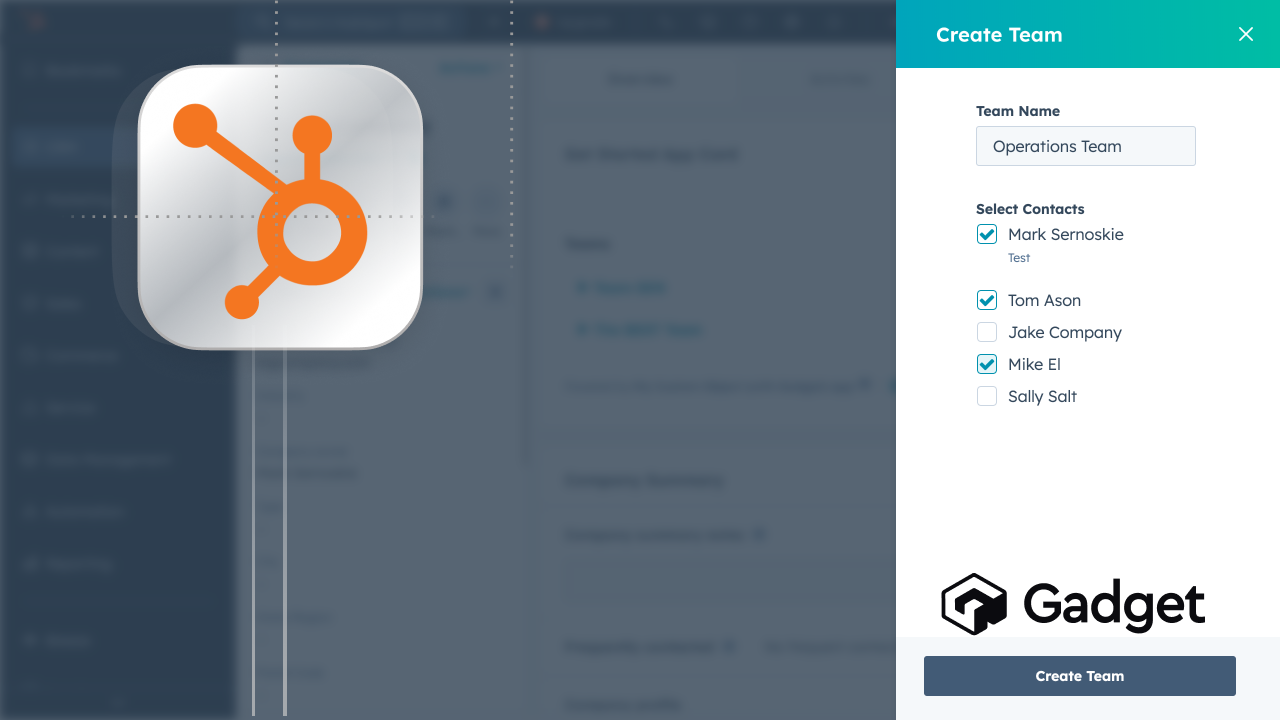
This template creates a custom object to manage groups within a company. Let's walk through it step by step!

The first step to a custom object is determining the fields and data required. This will be seen in the templates <inline-code>api/models/customObjectTeam<inline-code> model that contains the fields:

  • <inline-code>teamName<inline-code> - Name of the team
  • <inline-code>teamContacts<inline-code> - Array of HubSpot contact IDs
  • <inline-code>parentCompany<inline-code> - HubSpot company ID
  • <inline-code>portalId<inline-code> - HubSpot portal/account ID

These fields allow us to define a teamName and track associated contacts within the array.

When you create a model in Gadget it automatically creates the Postgres table and CRUD actions to handle Create, Update, and Delete, which are also included in the customObjectTeam model. 

The template exposes this custom object to HubSpot through a small set of Node-based API routes that act as an orchestration layer between HubSpot and Gadget’s data models.

The primary routes are <inline-code>api/routes/hubspot/GET-teams.ts<inline-code> and <inline-code>api/routes/hubspot/POST-action.ts<inline-code>, which handle reading, creating, and updating team records stored in Gadget’s Postgres database. These routes are responsible for coordinating HubSpot requests, applying conditional business logic, and translating HubSpot-specific identifiers into the internal data model.

By handling this logic in Node, the template keeps complex workflow and integration behavior outside of HubSpot while still allowing HubSpot to act as the primary interface for users. All route access is secured using JWT-based authentication, which is enforced consistently across these endpoints.
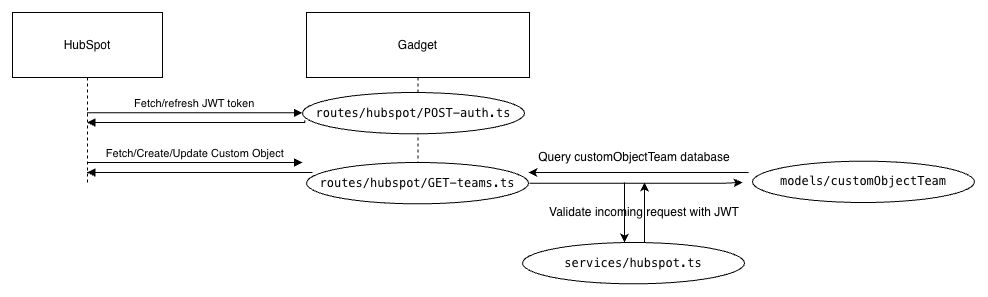
The app card uses JWT auth to securely query the Gadget backend from Hubspot using HubSpot’s v3 authentication spec, which is handled in <inline-code>api/routes/hubspot/POST-auth.ts<inline-code> and keeps the connection secure. 

Breaking down <inline-code>api/routes/hubspot/POST-auth.ts<inline-code>, it:

  • Extracts the Bearer token from the Authorization header
  • Verifies the JWT signature using <inline-code>GADGET_ENVIRONMENT_JWT_SIGNING_KEY<inline-code>
  • Checks that the session exists and hasn't expired (10-minute window)
  • Throws an error if any validation fails

By externalizing custom objects into Gadget, you regain control over your data model, your automations, and your long-term costs without giving up HubSpot as the system of record for relationships. If you’ve ever hit the same wall we did, this approach offers a practical, extensible way forward.

Mark Sernoskie
Author
Reviewer
Try Gadget
See the difference a full-stack development platform can make.
Create app
No items found.

Building Hubspot custom objects in Gadget

Extend HubSpot with custom objects powered by Gadget’s managed infrastructure, no Hubspot plan upgrade required!
Problem
Solution
Result

While working on internal automations in HubSpot, I hit a wall.

At Gadget, we have a partner program, and we wanted to optimize and automate this process as "we" - (Franco, Head of Partnerships) handled this process manually. As you can imagine, having to manage a massive spreadsheet of partners to ensure every referral is tracked and associated with a partner account is not the preferred way to start each and every morning.

I was tasked with finding a solution in HubSpot because tracking relationships between partners makes sense to do in a CRM (Customer ‘Relationship’ Management) tool.

But I hit a wall. I was unable to create more than 2 objects in Hubspot, and by default, HubSpot already contains 2 objects, Customers and Companies. 

So I checked what plan we would need to get one more object, and the price increase was the definition of “sticker shock”.

My next thought was “why not build the Hubspot extension in Gadget?”, which then expanded to “This would be an amazing template for users to plug-and-play for internal apps.”

That's how we got here with the HubSpot Static Object template. The goal here is to:

  • Save you a hefty annual subscription
  • Build your own custom automations
  • And keep your data if you end your subscription for that extra custom object

Watch a full walkthrough on deploying the app template here:

This template is built from the internal issues we had at Gadget and refined for other HubSpot users facing steep price increases to unlock additional functionality. The app template uses Gadget to rapidly provision Postgres-backed data models, automatically generate CRUD APIs, and manage authentication and environment configuration out of the box.

On top of this foundation, Node is used as an orchestration layer to handle HubSpot-specific workflows such as JWT validation, conditional business logic, and coordinated read/write operations between HubSpot and the Gadget database, making it well suited for managing team-level data within a larger organization as a custom object.

For example, you may have 2 separate customers under the same domain or company and in HubSpot, that is not easy to distinguish, nor is it practical to make and manage a separate variant Company object of that Company account.

This template creates a custom object to manage groups within a company. Let's walk through it step by step!

The first step to a custom object is determining the fields and data required. This will be seen in the templates <inline-code>api/models/customObjectTeam<inline-code> model that contains the fields:

  • <inline-code>teamName<inline-code> - Name of the team
  • <inline-code>teamContacts<inline-code> - Array of HubSpot contact IDs
  • <inline-code>parentCompany<inline-code> - HubSpot company ID
  • <inline-code>portalId<inline-code> - HubSpot portal/account ID

These fields allow us to define a teamName and track associated contacts within the array.

When you create a model in Gadget it automatically creates the Postgres table and CRUD actions to handle Create, Update, and Delete, which are also included in the customObjectTeam model. 

The template exposes this custom object to HubSpot through a small set of Node-based API routes that act as an orchestration layer between HubSpot and Gadget’s data models.

The primary routes are <inline-code>api/routes/hubspot/GET-teams.ts<inline-code> and <inline-code>api/routes/hubspot/POST-action.ts<inline-code>, which handle reading, creating, and updating team records stored in Gadget’s Postgres database. These routes are responsible for coordinating HubSpot requests, applying conditional business logic, and translating HubSpot-specific identifiers into the internal data model.

By handling this logic in Node, the template keeps complex workflow and integration behavior outside of HubSpot while still allowing HubSpot to act as the primary interface for users. All route access is secured using JWT-based authentication, which is enforced consistently across these endpoints.

The app card uses JWT auth to securely query the Gadget backend from Hubspot using HubSpot’s v3 authentication spec, which is handled in <inline-code>api/routes/hubspot/POST-auth.ts<inline-code> and keeps the connection secure. 

Breaking down <inline-code>api/routes/hubspot/POST-auth.ts<inline-code>, it:

  • Extracts the Bearer token from the Authorization header
  • Verifies the JWT signature using <inline-code>GADGET_ENVIRONMENT_JWT_SIGNING_KEY<inline-code>
  • Checks that the session exists and hasn't expired (10-minute window)
  • Throws an error if any validation fails

By externalizing custom objects into Gadget, you regain control over your data model, your automations, and your long-term costs without giving up HubSpot as the system of record for relationships. If you’ve ever hit the same wall we did, this approach offers a practical, extensible way forward.

Interested in learning more about Gadget?

Join leading agencies making the switch to Gadget and experience the difference a full-stack platform can make.